End-of-Life Software Response: Containment, Recovery, and Prevention
When vendor support ends, your system becomes a permanent target, requiring isolation rather than just patching to survive.

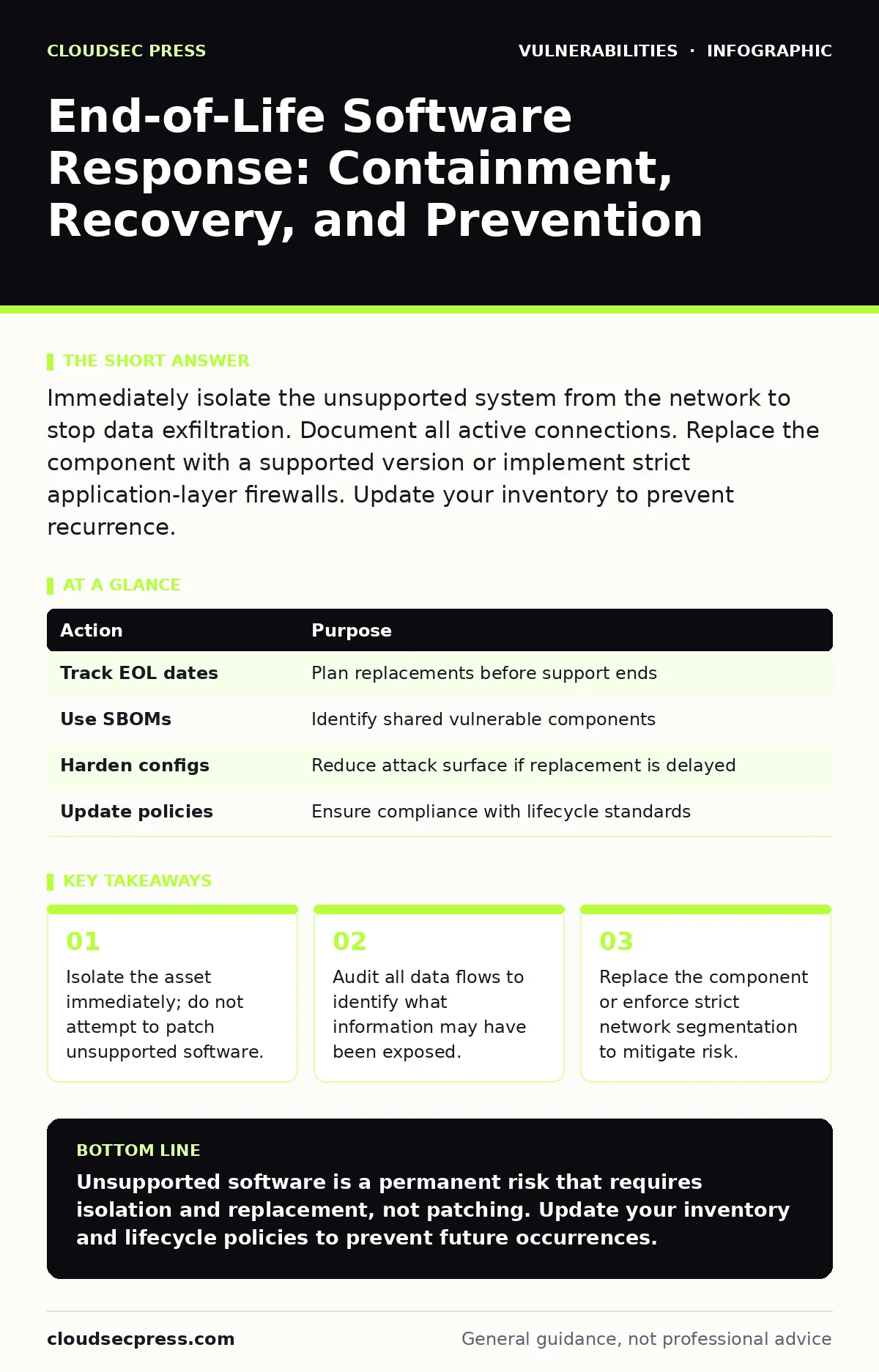
Immediately isolate the unsupported system from the network to stop data exfiltration. Document all active connections. Replace the component with a supported version or implement strict application-layer firewalls. Update your inventory to prevent recurrence.
First hour
When you discover that a critical system is running end-of-life software, the clock starts ticking. The vendor will no longer release security updates for this version. Every known vulnerability in that codebase remains open forever. Your goal is not to fix the software, but to contain the risk.
- Identify the exact version and vendor of the unsupported software.
- Isolate the system from the external network immediately.
- Disable remote management interfaces like SSH or RDP.
- Capture a snapshot of the system state for forensic analysis.
- Notify the incident response team and system owners.
You must assume the system is already compromised. Attackers scan for known signatures of unsupported software. If the system has been exposed to the internet, it likely has been accessed. Isolation prevents lateral movement to other parts of your infrastructure.
First day
After isolation, you need to understand the scope of the exposure. Check the logs for any unauthorized access attempts. Look for new user accounts or changes to system files. This helps you determine if an attacker successfully breached the system before you isolated it.
You should also review your software bill of materials (SBOM) if you have one. This document lists all components within your software stack. It helps you identify if other systems share the same vulnerable libraries. If they do, you may need to isolate those systems as well.
Imagine a web server running an unsupported operating system. An attacker exploits a known flaw to gain access. They then use that access to scan your internal network. By isolating the server, you stop the scan. But you must check if the attacker copied data before you cut the connection.
First week
Now you plan the recovery. You cannot simply patch the software. The vendor has stopped supporting it. You must replace the component with a supported version. If replacement is not possible, you must implement strict controls.
Consider using a configuration hardening strategy. Disable all unnecessary services and ports. Limit the system to only the functions it absolutely needs. This reduces the attack surface. However, this does not fix the underlying code flaws. It only makes exploitation harder.
You should also evaluate your patch testing procedures. Did you miss a final update before the end-of-life date? Review your process to ensure future transitions are smoother. Update your vulnerability management programs to flag unsupported software more prominently.
Who to tell
Communication is critical during this phase. Inform your legal team if customer data may have been exposed. They need to assess notification requirements. Tell your security operations center to monitor for indicators of compromise. They need to watch for unusual traffic patterns from the isolated segment.
Update your security bulletins to reflect the new risk profile. Other teams may be using similar software. They need to know the urgency. Coordinate with your vendors to see if extended support options exist. Some vendors offer paid extensions for a limited time.
How to stop a repeat
Prevention requires a shift in how you manage your assets. You must track the lifecycle of every piece of software. Integrate this tracking into your attack surface management processes. This helps you see the full picture of your external-facing assets.
Regular audits should identify software approaching its end-of-life date. Plan replacements well in advance. Do not wait until the support ends. This gives you time to test and deploy new solutions. It also reduces the pressure during the transition.
| Action | Purpose |
|---|---|
| Track EOL dates | Plan replacements before support ends |
| Use SBOMs | Identify shared vulnerable components |
| Harden configs | Reduce attack surface if replacement is delayed |
| Update policies | Ensure compliance with lifecycle standards |
See also: Ransomware Recovery Plans: 8 Practices for Downtime Reduction · Cyber Espionage Prevention Checklist: Stop Silent Data Theft
The hidden cost of delay
Many organizations delay replacement due to cost or complexity. This creates a false sense of security. The software works, so you assume it is safe. But the risk grows every day. Attackers publish exploits for known flaws. These exploits are automated and widespread.
Suppose you have a database running unsupported software. You rely on network segmentation to protect it. An attacker finds a way in through a different vector. They move laterally to the database. Because it is unsupported, they find an easy path to exploit. The delay cost you more than a timely replacement would have.
Final steps
Once the new system is in place, decommission the old one securely. Wipe all data from the old hardware or storage. Ensure no backups of the unsupported software remain active. Update your documentation to reflect the change.
Review the incident with your team. What went well? What could be improved? Use these lessons to refine your processes. This turns a negative event into a learning opportunity. It strengthens your overall security posture for the future.
Key takeaways
- Isolate the asset immediately; do not attempt to patch unsupported software.
- Audit all data flows to identify what information may have been exposed.
- Replace the component or enforce strict network segmentation to mitigate risk.
Unsupported software is a permanent risk that requires isolation and replacement, not patching. Update your inventory and lifecycle policies to prevent future occurrences.
Frequently asked questions
Can I extend support for end-of-life software?
Some vendors offer paid extended support, but this is temporary and often expensive. It is not a long-term solution.
How do I know if my software is end-of-life?
Check the vendor’s official website or your software bill of materials. Look for the last date of support or updates.
What if I can’t replace the software immediately?
Isolate the system and implement strict configuration hardening. Limit access and monitor closely until replacement is possible.
Does network segmentation protect unsupported software?
It reduces risk but does not eliminate it. If an attacker breaches the perimeter, they can still target the isolated segment.
How this guide was produced: written by the CloudSec Press editorial team with AI assistance, checked against the public references listed below, and reviewed when the facts change. See our editorial policy or report an error.