DLL Hijacking: How to Stop Code Execution Attacks
Attackers exploit the order in which Windows searches for files, allowing them to run malicious code simply by placing a file in the wrong folder.
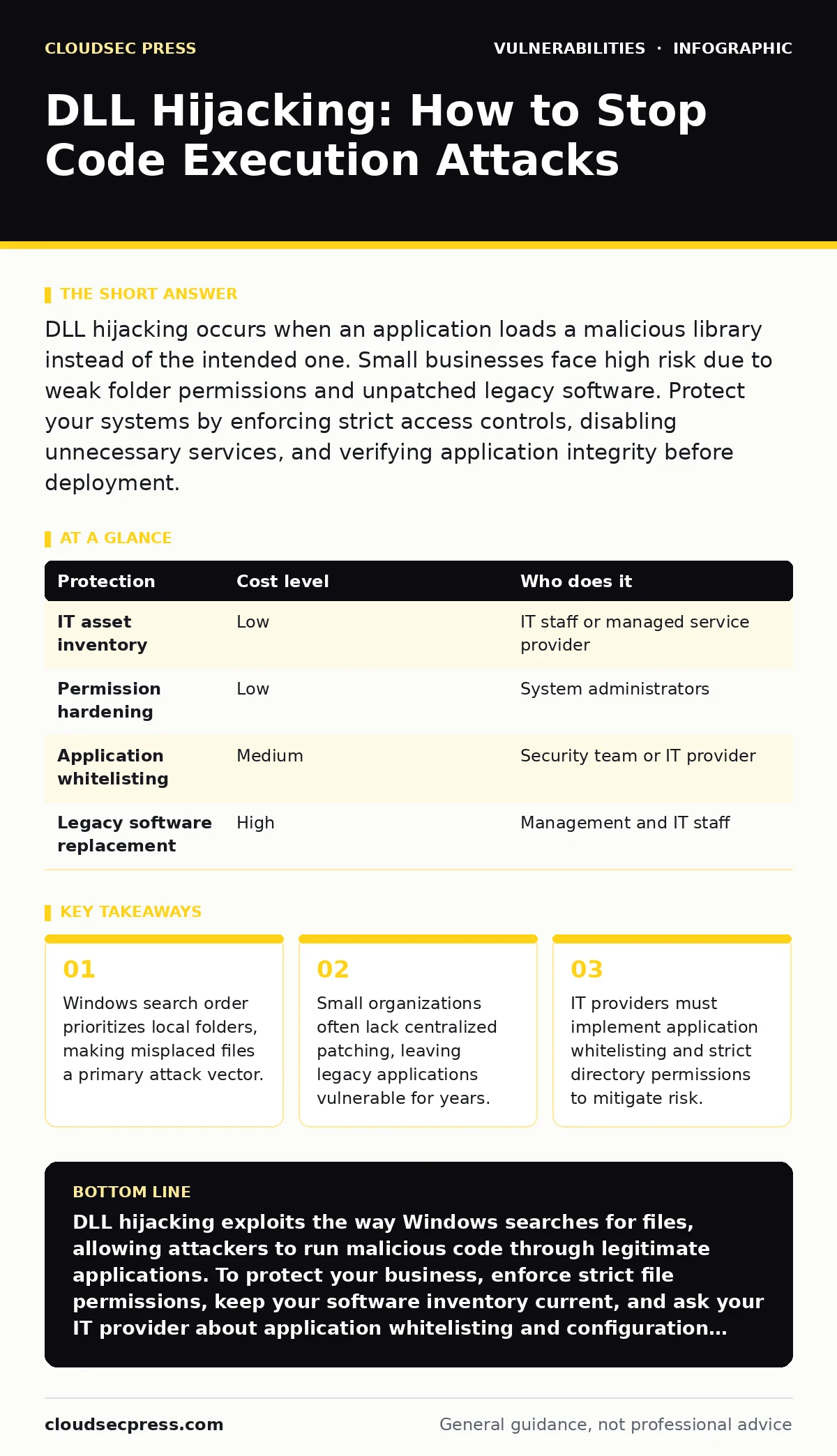
DLL hijacking occurs when an application loads a malicious library instead of the intended one. Small businesses face high risk due to weak folder permissions and unpatched legacy software. Protect your systems by enforcing strict access controls, disabling unnecessary services, and verifying application integrity before deployment.
The Mechanism of DLL Hijacking
Dynamic Link Libraries, or DLLs, are files that contain code and data that multiple programs can use simultaneously. This design saves memory and promotes code reuse. However, it creates a specific vulnerability when an application does not specify the full path to the library it needs.
When an executable requests a library, Windows searches for it in a specific order. It checks the directory containing the executable first. If it does not find the file there, it moves to the system directory, then the Windows directory, and finally the directories listed in the system PATH environment variable.
This search order is the core of the vulnerability. If an attacker can place a malicious file with the same name as a legitimate library in a folder that is searched earlier, the application will load the malicious version. This technique is known as DLL search order hijacking.
The attacker does not need to exploit a coding error in the application itself. They only need write access to a folder that the application checks before the secure system folders. This makes the threat particularly dangerous for users with standard administrative rights.
Why Small Organizations Are Exposed
Small businesses often operate with limited IT resources. They may rely on older software that is no longer supported by the vendor. This reliance on end-of-life software creates a persistent risk because these applications often lack modern security features like secure DLL loading.
Furthermore, small teams frequently share resources to save costs. Files might be stored on network drives with loose permission settings. If an application searches a shared network drive before the local system directory, any user with write access to that drive can inject malicious code.
The lack of centralized monitoring exacerbates the issue. In larger enterprises, security information and event management systems might flag unusual library loading behavior. Small organizations often lack these tools, allowing hijacked processes to run silently for weeks or even months.
Imagine a small accounting firm using a legacy tax preparation tool. The tool is installed on a shared drive to allow multiple accountants to access it. An attacker who gains basic network access can place a malicious DLL in that shared folder. When any accountant runs the tool, their computer executes the attacker's code.
The Hidden Cost of Legacy Software
Keeping old software running is often a business decision, not a technical one. Some applications are critical for daily operations and have no modern equivalent. However, the cost of maintaining these applications in a secure state is often underestimated.
One hidden cost is the inability to benefit from modern security defaults. Newer versions of Windows have features like Safe DLL Search Mode, which changes the default search order to prioritize system directories. Older applications may not support these features, or they may disable them to maintain compatibility.
Another cost is the complexity of patching. Even if a vendor releases a security update, testing it in a small environment can be risky. A failed patch can break critical workflows. This leads to delay or avoidance of updates, a practice known as living with n-day vulnerabilities.
The result is a growing attack surface. Each unpatched legacy application is a potential entry point for DLL hijacking. The risk compounds over time as the software diverges from current security standards.
Low-Cost Protections for Limited Budgets
You do not need expensive security suites to mitigate this risk. Several low-cost or free measures can significantly reduce your exposure. The first step is to conduct a thorough IT asset inventory. You cannot protect what you do not know you have.
Identify all applications running on your network, including legacy tools. Check the vendor’s website to see if the software is still supported. If it is end-of-life, consider replacing it or isolating it on a separate network segment that has no internet access.
Next, enforce strict file permissions. Ensure that only trusted administrators have write access to directories where executables and libraries are stored. This prevents attackers from placing malicious files in sensitive locations. Use the principle of least privilege to limit user rights.
Application whitelisting is another effective control. This technology allows only approved applications to run on your systems. If a malicious DLL tries to execute, the whitelisting software blocks it because it is not on the approved list. Many operating systems include basic whitelisting features that are free to use.
| Protection | Cost level | Who does it |
|---|---|---|
| IT asset inventory | Low | IT staff or managed service provider |
| Permission hardening | Low | System administrators |
| Application whitelisting | Medium | Security team or IT provider |
| Legacy software replacement | High | Management and IT staff |
What to Ask Your IT Provider
If you outsource your IT management, you must ensure your provider understands this specific risk. General statements about "security" are not enough. You need to ask specific questions about how they handle software integrity and patching.
Ask your provider how they manage patch testing. They should have a process for verifying that updates do not break critical applications before deploying them widely. This reduces the risk of business disruption while ensuring timely security fixes.
Inquire about their vulnerability management programs. Do they regularly scan for known vulnerabilities, including those related to DLL loading? Ask how they prioritize fixes based on the severity of the risk and the exposure of the affected systems.
Finally, ask about configuration hardening. Do they disable unnecessary services and features that could increase the attack surface? For example, disabling legacy network protocols can prevent certain types of hijacking attacks. These details reveal whether your provider takes a proactive or reactive approach to security.
- How do you identify and inventory all software on our network?
- What is your process for testing patches before deployment?
- How do you monitor for unauthorized code execution?
- Do you implement application whitelisting on all endpoints?
- How do you handle end-of-life software that we still need to use?
See also: IaaS, PaaS and SaaS security: small business defense strategies · Leaked Source Code Risks: How Small Teams Prevent Exposure
The Role of Configuration Hardening
Configuration hardening involves securing a system by reducing its attack surface. This means disabling features that are not needed and tightening access controls. For DLL hijacking, this includes ensuring that applications use full paths when loading libraries.
Developers can fix this issue by specifying the full path to the DLL in the application code. However, if you are using third-party software, you cannot change the code. Instead, you can use operating system features to enforce safer loading behavior.
Windows provides a system-wide setting that modifies the DLL search order. Enabling this setting ensures that the system directories are checked before the application directory. This prevents most simple hijacking attempts where the attacker places a file in the same folder as the executable.
You should also ensure that the PATH environment variable is clean. Remove any directories that do not need to be in the search path. This reduces the number of locations an attacker can exploit. Regular audits of these settings are necessary, as changes can occur over time.
Beyond Basic Protections
While the measures above address the immediate risk of DLL hijacking, they do not provide complete protection. Attackers are constantly evolving their techniques. You must adopt a layered defense strategy that includes monitoring and incident response.
Consider implementing a software bill of materials (SBOM) for your critical applications. An SBOM lists all the components and libraries used in an application. This helps you understand the dependencies and assess the risk of each component.
If a vulnerability is discovered in a specific library, you can quickly identify which applications use it. This allows you to prioritize patches and mitigate risks more effectively. An SBOM is particularly useful for small businesses that use complex software stacks.
Remember that security is an ongoing process. Regularly review your defenses and update your strategies as new threats emerge. By understanding the mechanisms of DLL hijacking, you can take proactive steps to protect your organization.
Key takeaways
- Windows search order prioritizes local folders, making misplaced files a primary attack vector.
- Small organizations often lack centralized patching, leaving legacy applications vulnerable for years.
- IT providers must implement application whitelisting and strict directory permissions to mitigate risk.
DLL hijacking exploits the way Windows searches for files, allowing attackers to run malicious code through legitimate applications. To protect your business, enforce strict file permissions, keep your software inventory current, and ask your IT provider about application whitelisting and configuration hardening.
Frequently asked questions
How do I know if my system has been compromised by DLL hijacking?
Look for unusual process behavior, such as legitimate applications spawning unexpected child processes. Monitor for changes in file permissions or the appearance of new files in system directories. Security tools that monitor process creation can help detect these anomalies.
Can antivirus software prevent DLL hijacking?
Traditional antivirus software may not detect DLL hijacking if the malicious file is small or new. However, modern endpoint detection and response solutions can analyze behavior and block suspicious loading attempts. Ensure your security software includes behavior-based detection capabilities.
Is DLL hijacking only a Windows problem?
DLL hijacking is specific to Windows because of its use of Dynamic Link Libraries. Other operating systems use different library formats and loading mechanisms, which have their own vulnerabilities. For example, Linux systems can be vulnerable to library path injection attacks.
How often should I review my software inventory?
You should review your software inventory at least quarterly. More frequent reviews are recommended if you frequently install or update software. Automated inventory tools can help maintain an accurate and up-to-date list of all applications on your network.
How this guide was produced: written by the CloudSec Press editorial team with AI assistance, checked against the public references listed below, and reviewed when the facts change. See our editorial policy or report an error.