Patch Testing Best Practices That Prevent Production Failures
Most patch failures stem from missing dependency conflicts, not code errors, making automated regression testing the single most effective defense against downtime.
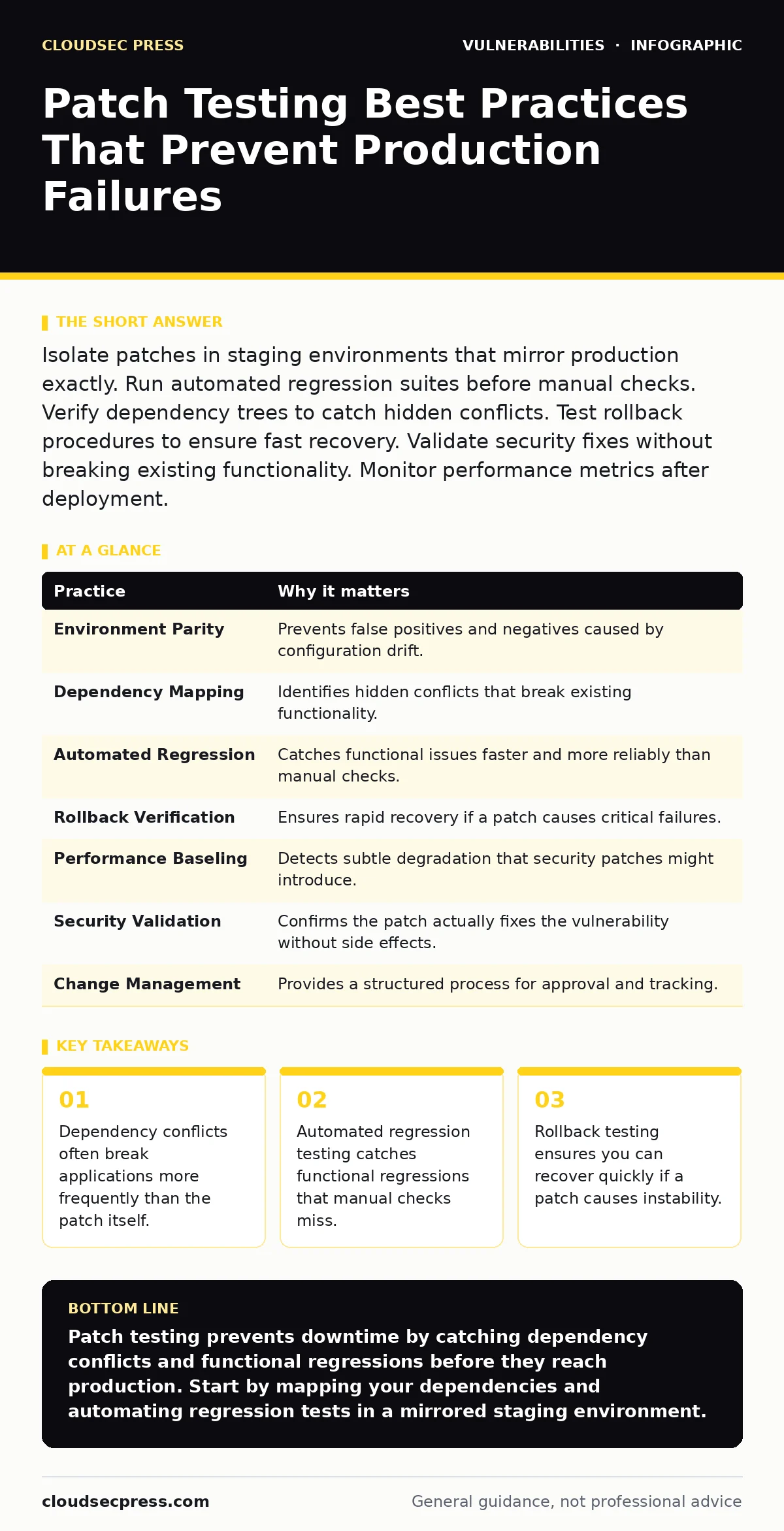
Isolate patches in staging environments that mirror production exactly. Run automated regression suites before manual checks. Verify dependency trees to catch hidden conflicts. Test rollback procedures to ensure fast recovery. Validate security fixes without breaking existing functionality. Monitor performance metrics after deployment.
Define the Scope of Your Test Environment
The first step in patch testing is ensuring your test environment matches your production environment in hardware, software versions, and configuration. If the environments differ, test results become meaningless because behavior may vary between the two systems. You must replicate the exact stack, including operating system versions, library dependencies, and network configurations.
Imagine a web application that behaves correctly on a local developer machine but fails in production due to a missing shared library. This discrepancy causes false negatives during testing. You need to automate the provisioning of test environments to ensure consistency. Use infrastructure-as-code tools to deploy identical environments for each test cycle. This reduces human error and ensures that the patch interacts with the same components it will face in production.
| Practice | Why it matters |
|---|---|
| Environment Parity | Prevents false positives and negatives caused by configuration drift. |
| Dependency Mapping | Identifies hidden conflicts that break existing functionality. |
| Automated Regression | Catches functional issues faster and more reliably than manual checks. |
| Rollback Verification | Ensures rapid recovery if a patch causes critical failures. |
| Performance Baseling | Detects subtle degradation that security patches might introduce. |
| Security Validation | Confirms the patch actually fixes the vulnerability without side effects. |
| Change Management | Provides a structured process for approval and tracking. |
Map Dependencies Before Applying Patches
Patches rarely exist in isolation. They often update shared libraries or modify system components that other applications rely on. When you update a core component, you risk breaking applications that depend on specific versions of that component. This is known as dependency hell. You must map all dependencies before applying any patch.
Suppose you update a cryptographic library to fix a known vulnerability. Several legacy applications on the server rely on the older version of that library for compatibility. Updating the library causes those applications to crash. To prevent this, maintain an up-to-date inventory of software dependencies. Use dependency management tools to visualize relationships between components. This allows you to identify potential conflicts before they cause outages.
Run Automated Regression Suites
Manual testing is slow and prone to human error. It is impossible for a human to test every possible input and interaction path in a complex application. Automated regression testing runs a predefined set of tests to ensure that existing functionality still works after the patch is applied. These tests should cover critical business functions, user authentication, and data integrity.
Imagine a financial application where a patch inadvertently changes how decimal numbers are rounded. Manual testers might miss this subtle change, leading to incorrect calculations. Automated tests catch these discrepancies immediately. You should integrate automated testing into your continuous integration pipeline. This ensures that every patch is validated against a comprehensive suite of tests before it ever reaches a staging environment.
Validate Security Fixes Explicitly
Applying a patch is not enough; you must verify that it actually resolves the intended vulnerability. Vendors sometimes release patches that are incomplete or require additional configuration changes to be effective. You need to test the specific vulnerability that the patch addresses. This often involves running vulnerability scanning tools or performing manual penetration tests against the patched system.
Suppose a patch claims to fix a command injection vulnerability. You must attempt to inject malicious commands into the application to confirm the fix works. If the injection still succeeds, the patch is ineffective. You should reference security bulletins to understand the specific vectors the patch addresses. This targeted testing ensures that you are not just applying code, but actually closing the security gap.
Test Rollback Procedures Proactively
Even with thorough testing, patches can cause unexpected issues in production. When this happens, you need to revert to the previous state quickly. Testing rollback procedures is just as important as testing the patch itself. You should practice rolling back patches in your staging environment to ensure the process works smoothly.
Imagine a scenario where a patch causes a database schema conflict. If you have not tested the rollback, restoring the previous database backup might take hours, during which your service is down. You must document and automate rollback steps. This includes backing up configurations and data before applying the patch. Regularly testing these procedures ensures you can recover from failure within your acceptable downtime window.
See also: Security Bulletins Explained: Meaning, Purpose, and Daily Use
Monitor Performance Metrics Closely
Security patches can sometimes introduce performance overhead. This might be due to additional logging, stricter validation checks, or changes in how resources are managed. You need to monitor key performance metrics before and after applying the patch. Compare these metrics against established baselines to identify any significant degradation.
Suppose a patch adds extra encryption steps to data transmission. This might increase latency and reduce throughput. If you do not monitor performance, users will experience slower response times, leading to dissatisfaction. You should use application performance monitoring tools to track metrics like response time, error rates, and resource utilization. This helps you identify performance issues early and adjust configurations if necessary.
Integrate with Configuration Hardening
Patches often interact with system configurations. A patch might enable a new feature that requires specific configuration changes to be secure. If you do not align patching with configuration hardening, you may leave new attack surfaces open. You must review configuration recommendations provided by the vendor and apply them alongside the patch.
Imagine a patch that enables a new administrative interface. If you do not restrict access to this interface, attackers can exploit it. You should integrate patch testing with your configuration management process. This ensures that security settings are updated consistently. Refer to configuration hardening guidelines to ensure that your systems remain secure after each update.
Manage Change with Documentation
Patch testing is part of a broader change management process. You must document every step, from initial testing to final deployment. This documentation provides a trail for auditing and troubleshooting. It also helps new team members understand the process and the rationale behind specific decisions.
Suppose a patch causes an issue six months after deployment. Without proper documentation, it is difficult to determine what changed and why. You should maintain a change log that includes test results, rollback procedures, and configuration changes. This transparency improves accountability and makes it easier to resolve issues quickly.
Verify Prototype Pollution Fixes in JavaScript
If your application uses JavaScript, you must be aware of prototype pollution vulnerabilities. These occur when an attacker modifies the prototype of an object, affecting all instances of that object. Patches for JavaScript libraries often address these issues, but they can be subtle and hard to detect. You need to specifically test for prototype pollution after applying patches to JavaScript dependencies.
Imagine a web application that uses a popular JavaScript library. A patch updates the library to prevent prototype pollution. You must test that object properties cannot be modified through prototype chains. This requires specific test cases that attempt to pollute the prototype. Ignoring this can leave your application vulnerable to remote code execution and other severe attacks.
Key takeaways
- Dependency conflicts often break applications more frequently than the patch itself.
- Automated regression testing catches functional regressions that manual checks miss.
- Rollback testing ensures you can recover quickly if a patch causes instability.
Patch testing prevents downtime by catching dependency conflicts and functional regressions before they reach production. Start by mapping your dependencies and automating regression tests in a mirrored staging environment.
Frequently asked questions
How long should I keep a patch in the testing environment?
Keep the patch in the testing environment for at least one full business cycle to observe any delayed issues. This ensures that intermittent problems are caught before deployment.
Can I skip testing for minor security patches?
No. Minor patches can still introduce breaking changes or interact poorly with existing configurations. Every patch must be tested to ensure stability and security.
What is the best way to handle legacy systems that cannot be patched?
Isolate legacy systems from the network and apply compensating controls like web application firewalls. This reduces the attack surface while you plan for eventual replacement.
How do I know if a patch is stable enough for production?
A patch is stable if it passes all automated regression tests, performance benchmarks, and security validations in a production-mirrored environment.
How this guide was produced: written by the CloudSec Press editorial team with AI assistance, checked against the public references listed below, and reviewed when the facts change. See our editorial policy or report an error.