Ransomware Incident Response: Stop the Spread and Recover Data
Most organizations fail because they focus on decryption before isolating the network, allowing the malware to encrypt every connected drive before responders arrive.
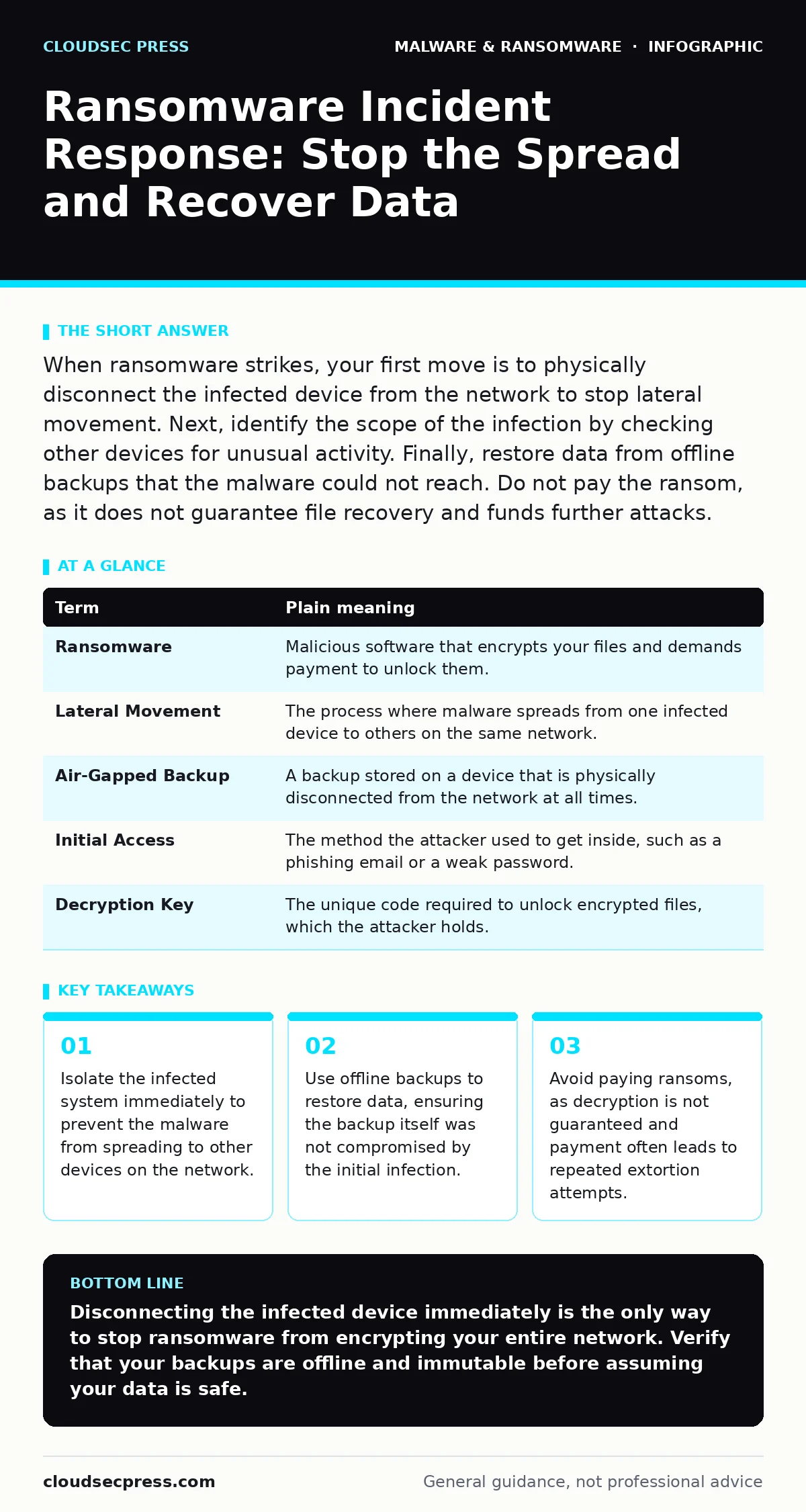
When ransomware strikes, your first move is to physically disconnect the infected device from the network to stop lateral movement. Next, identify the scope of the infection by checking other devices for unusual activity. Finally, restore data from offline backups that the malware could not reach. Do not pay the ransom, as it does not guarantee file recovery and funds further attacks.
The House Fire Analogy
Imagine a fire breaks out in your kitchen. The flames are consuming the cabinets, but the heat has not yet reached the rest of the house. Your instinct might be to run into the burning room to save your favorite recipe book. If you do this without closing the doors, the fire spreads to the living room and bedrooms. You lose everything. Ransomware works the same way. The malware is the fire. Your data is the house. Your immediate goal is not to save the burning files. It is to close the doors and stop the fire from spreading.
Key Terms Defined
Ransomware moves fast. You need to understand the mechanics to react correctly. The table below defines the core concepts you will encounter during an incident.
| Term | Plain meaning |
|---|---|
| Ransomware | Malicious software that encrypts your files and demands payment to unlock them. |
| Lateral Movement | The process where malware spreads from one infected device to others on the same network. |
| Air-Gapped Backup | A backup stored on a device that is physically disconnected from the network at all times. |
| Initial Access | The method the attacker used to get inside, such as a phishing email or a weak password. |
| Decryption Key | The unique code required to unlock encrypted files, which the attacker holds. |
The First Practical Step
Your first action must be physical disconnection. Do not shut down the computer. Shutting down can cause data loss in volatile memory, which might help investigators later. Instead, pull the Ethernet cable. If the device is on Wi-Fi, turn off the wireless radio or put the device in airplane mode. This stops the malware from communicating with the attacker’s command and control servers. It also prevents the malware from searching for other computers on your network. This is the only step that matters in the first minute.
Assessing the Damage
Once the infected device is isolated, you must determine how far the fire has spread. Check other devices on your network for signs of infection. Look for files with new, strange extensions. Notice if applications fail to open or if system performance is unusually slow. Check your email servers for mass outgoing messages. Attackers often use compromised accounts to spread the malware to other users via email. If you use endpoint detection and response (EDR) tools, review the alerts for unusual process behavior. This helps you map the full scope of the incident before you begin recovery.
The Hidden Cost of Backups
Many organizations believe their backups are safe because they are stored on a separate server. This is a dangerous assumption. If your backup system is connected to the same network as your production servers, ransomware can find it. Modern ransomware is designed to hunt for shared drives and network-attached storage. It will encrypt your backups before you even notice the initial infection. This is why immutable backups are critical. These are backups that cannot be changed or deleted for a set period, even by administrators. They provide a clean restore point that the malware cannot touch.
See also: Cyber Espionage Prevention Checklist: Stop Silent Data Theft · Botnet Attack Mistakes That Leave Your Network Exposed
Why You Should Not Pay
Paying the ransom is rarely a viable option. There is no guarantee the attacker will provide the decryption key. Even if they do, the key might be corrupted or incomplete. Paying also marks you as a target for future attacks. Attackers keep records of who pays. They know you have the funds and the willingness to comply. Furthermore, paying supports the criminal ecosystem, leading to more sophisticated attacks. Instead, focus on recovering from clean copies of your data. This takes time, but it is the only reliable path to full recovery.
Try This Now
- [ ] Identify your most critical data and ensure it is backed up to an offline or immutable storage solution.
- [ ] Test your backup restoration process quarterly to verify the files are not corrupted and can be read.
- [ ] Document the physical location of network switches and routers so you can quickly disconnect devices during an emergency.
Preventing Future Incidents
Recovery is only part of the battle. You must also close the door the attacker used. Review your attack surface reduction rules to limit what applications can do on your systems. For example, you can block scripts from running in certain folders. This stops many common infection methods. Be wary of macro malware in documents, which often serves as the initial entry point. Also, check for potentially unwanted programs that might weaken your system’s defenses. Understanding firmware malware is also useful, as these deep-rooted threats can survive a full system wipe and re-infect your devices from the lowest level.
The Role of Droppers
Ransomware rarely arrives alone. It usually comes with a malware dropper or loader. This is a small piece of code that downloads the main ransomware payload from the internet. If you only remove the ransomware, the dropper remains. It will simply download a new copy. You must identify and remove the dropper to fully clean the system. This is why professional incident response teams spend more time hunting for the initial access tool than decrypting files. The dropper is the root cause. The ransomware is just the symptom.
Key takeaways
- Isolate the infected system immediately to prevent the malware from spreading to other devices on the network.
- Use offline backups to restore data, ensuring the backup itself was not compromised by the initial infection.
- Avoid paying ransoms, as decryption is not guaranteed and payment often leads to repeated extortion attempts.
Disconnecting the infected device immediately is the only way to stop ransomware from encrypting your entire network. Verify that your backups are offline and immutable before assuming your data is safe.
Frequently asked questions
How long does it take to recover from ransomware?
Recovery time varies based on the amount of data and the integrity of your backups. It can range from a few hours to several weeks for large organizations.
Can antivirus software stop ransomware?
Traditional antivirus may detect known ransomware signatures, but it often fails against new or custom variants. Behavioral detection is more effective.
Is cloud storage safe from ransomware?
Cloud storage is only safe if you have versioning enabled and the attacker cannot access your cloud account credentials. If they compromise your account, they can delete or encrypt cloud files too.
What is scareware?
Scareware is a type of social engineering that tricks users into thinking their system is infected, prompting them to download malicious software or pay for fake services.
How this guide was produced: written by the CloudSec Press editorial team with AI assistance, checked against the public references listed below, and reviewed when the facts change. See our editorial policy or report an error.