DKIM Explained: How Email Signatures Prevent Spoofing
DKIM adds a cryptographic signature to email headers that receivers verify against public DNS records to confirm the message was not altered in transit.
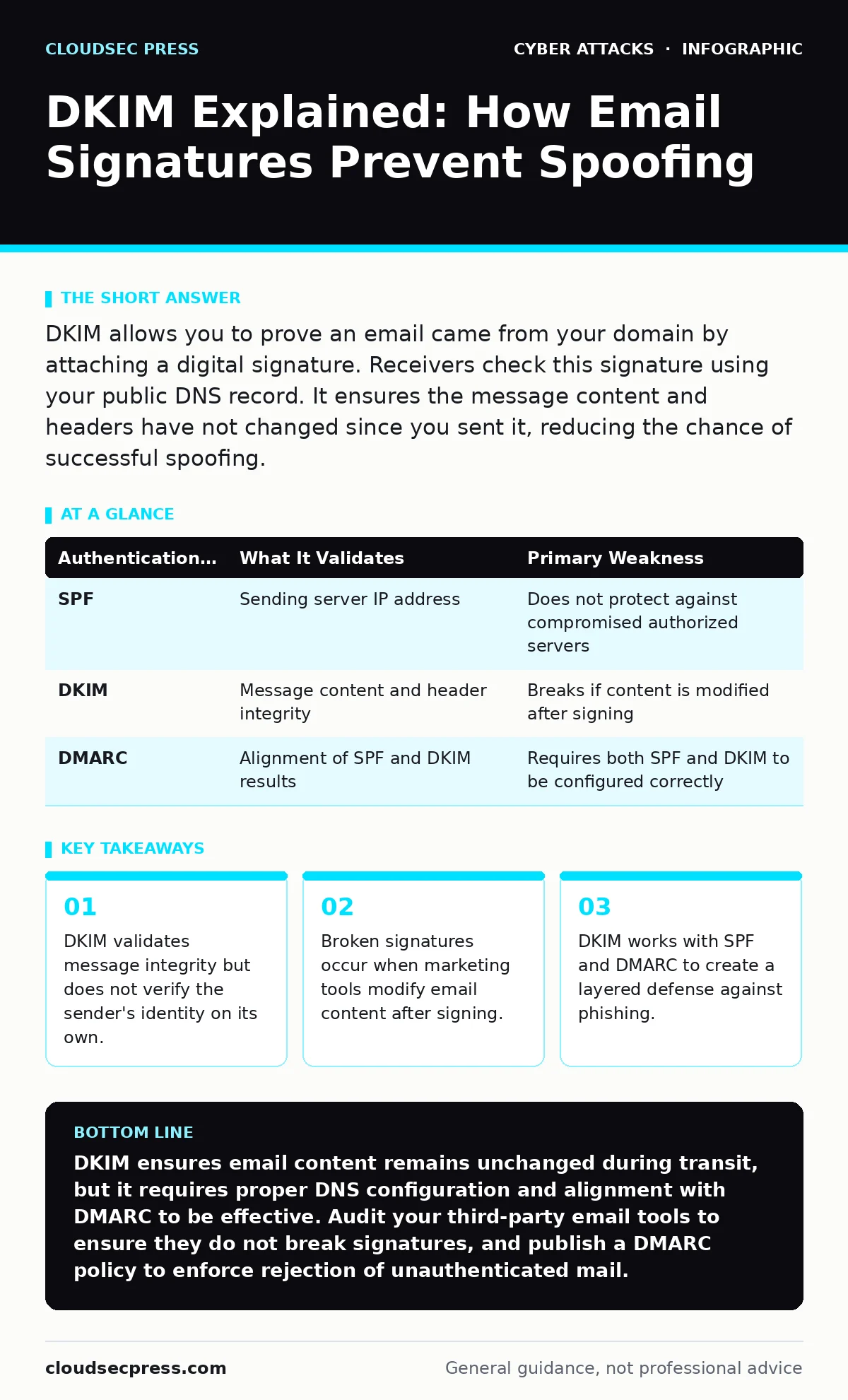
DKIM allows you to prove an email came from your domain by attaching a digital signature. Receivers check this signature using your public DNS record. It ensures the message content and headers have not changed since you sent it, reducing the chance of successful spoofing.
What is DKIM and how does it work?
DKIM is DomainKeys Identified Mail, a standard that adds a cryptographic signature to email headers. The sending server signs specific parts of the email using a private key. The receiving server retrieves the corresponding public key from your DNS records. It then recalculates the signature and compares it to the one in the header. A match proves the message has not been altered since it left your server.
Why does DKIM matter for email security?
DKIM provides integrity assurance for email transmission. Without it, attackers can modify the subject line or body of a legitimate-looking email while it travels between servers. This modification can inject malicious links or change the context of the message. DKIM detects these changes because the signature will no longer match the altered content. It stops tampering but does not stop an attacker from sending a new, unsigned email.
How does DKIM differ from SPF?
SPF and DKIM solve different problems in email authentication. SPF checks the IP address of the sending server against a list of authorized hosts in your DNS. It verifies where the email came from. DKIM verifies what the email contains and who signed it. SPF fails if the IP is wrong. DKIM fails if the content changes or the signature is missing. You need both to cover different attack vectors. Imagine an attacker uses an authorized server to send a modified message. SPF passes, but DKIM fails.
What happens if a DKIM signature fails?
A failed DKIM signature tells the receiver that the message was altered or forged. Most email providers do not automatically delete these messages. They might place the email in the spam folder or add a warning banner. The final action depends on the receiver’s policies and your DMARC settings. If you have not published a DMARC record, the receiver has no instruction on how to handle the failure. The email may still reach the inbox, reducing the effectiveness of your security efforts.
Why do my DKIM signatures break sometimes?
Signatures break when third-party services modify the email after you sign it. Many marketing platforms add tracking pixels, footers, or unsubscribe links. These changes alter the message body or headers. The receiver calculates a different hash than the one in your signature. The verification fails. You must configure these services to preserve the DKIM signature or re-sign the message after modification. This requires coordination between your IT team and your marketing tools.
| Authentication Method | What It Validates | Primary Weakness |
|---|---|---|
| SPF | Sending server IP address | Does not protect against compromised authorized servers |
| DKIM | Message content and header integrity | Breaks if content is modified after signing |
| DMARC | Alignment of SPF and DKIM results | Requires both SPF and DKIM to be configured correctly |
See also: How Email Attachment Scanning Works: Limits and Bypasses · Malicious Email Attachments: How to Spot Hidden Threats
How do I configure DKIM for my domain?
You generate a key pair on your email server or service provider. The private key stays with your server to sign outgoing mail. The public key is published in your DNS as a TXT record. The record name usually includes a selector, which identifies the specific key. You must ensure the DNS record is accurate and propagates to all name servers. Test the configuration by sending a message and checking the headers. Many providers offer automated tools to generate and publish these records.
Can DKIM stop all phishing attacks?
DKIM cannot stop all phishing attacks on its own. It only verifies that the message came from a server authorized to sign for your domain. If an attacker compromises your email server, they can sign malicious messages with your valid key. DKIM will pass verification. This is why you need DMARC to enforce policies and monitor for abuse. DMARC tells receivers to reject or quarantine emails that fail authentication. It also provides reports on who is sending email using your domain.
What is the relationship between DKIM and DMARC?
DMARC relies on DKIM and SPF to make enforcement decisions. DMARC checks if the domain in the "From" header aligns with the domain that passed SPF or DKIM verification. If DKIM passes but the domain does not align, DMARC considers it a failure. This prevents attackers from using a subdomain with valid DKIM to impersonate your main brand. DMARC ties the technical authentication to the visual sender identity. It creates a policy layer that receivers can enforce.
How do I troubleshoot DKIM alignment issues?
Alignment issues occur when the domain used for signing differs from the visible "From" domain. Suppose you send email from [email protected] but sign it with a key from mail.yourbrand.com. DKIM verification passes, but DMARC alignment fails. You must ensure the DKIM selector belongs to the exact domain shown in the From header. Check your DNS records for the correct public key. Verify that your email service provider is using the right domain for signing. Misalignment is a common cause of delivery failures.
Does DKIM protect against session hijacking?
No, DKIM does not protect against session hijacking. Session hijacking involves stealing an active user session token to impersonate them on a web application. DKIM only secures the transmission of email messages. It has no connection to web session management or user authentication tokens. To prevent session hijacking, you must use secure cookies, HTTPS, and short session lifetimes. Email security and web application security require separate controls.
Key takeaways
- DKIM validates message integrity but does not verify the sender's identity on its own.
- Broken signatures occur when marketing tools modify email content after signing.
- DKIM works with SPF and DMARC to create a layered defense against phishing.
DKIM ensures email content remains unchanged during transit, but it requires proper DNS configuration and alignment with DMARC to be effective. Audit your third-party email tools to ensure they do not break signatures, and publish a DMARC policy to enforce rejection of unauthenticated mail.
Frequently asked questions
Can I use DKIM without SPF?
You can use DKIM without SPF, but it is not recommended. DKIM verifies content integrity while SPF verifies the sending server. Using both provides layered security and allows DMARC to function correctly for policy enforcement.
How often should I rotate DKIM keys?
Rotate DKIM keys regularly, such as annually or when staff changes occur. Rotation limits the damage if a private key is compromised. Ensure the old key remains in DNS long enough for existing emails to be verified before removing it.
Does DKIM hide the sender's IP address?
DKIM does not hide the sender's IP address. The IP is visible in the email headers. DKIM adds a signature to prove the message was not altered. If you need to hide the IP, you must use other privacy measures, which may conflict with email deliverability requirements.
What is a DKIM selector?
A DKIM selector is a label used to identify which public key in your DNS records should be used for verification. It allows you to manage multiple keys for the same domain, facilitating key rotation without disrupting email delivery.
How this guide was produced: written by the CloudSec Press editorial team with AI assistance, checked against the public references listed below, and reviewed when the facts change. See our editorial policy or report an error.